


Short answer: Maintenance approval queue software shows every job that cannot move because it is waiting for access, a quotation, parts, a supervisor, a tenant, or a client decision. Each waiting item needs a named approver, request date, required information, target date, next escalation, and visible link to the original work order.
An approval queue is not simply a list of open jobs. It separates work that a technician can act on from work blocked by a decision or dependency. That distinction gives property managers and contractors a practical way to prevent silent delays.
Why approvals disappear inside maintenance workflows
Approval requests often live in email threads, chats, quotation documents, phone-call notes, or a coordinator’s personal task list. The work order may say “pending,” but that status does not explain what is pending, who owns the next action, or when the request should be escalated.
A structured queue turns “pending” into an operational record. It should answer five questions immediately: What is needed? Who must provide it? When was it requested? What is the operational impact? What happens if there is no response?
Common maintenance approval types
- Access approval: permission, keys, escort, tenant availability, security clearance, or a work permit.
- Quotation approval: acceptance of scope, price, exclusions, or a variation.
- Parts approval: confirmation to order, substitute, expedite, or use stock.
- Technical approval: supervisor or specialist review of a method, diagnosis, or proposed repair.
- Client or landlord approval: authority to proceed under a contract, budget, or responsibility boundary.
- Closure approval: acknowledgement that evidence and completed scope meet the requirement.
These should not all share one generic state. Different approval types need different evidence, owners, and escalation rules.
The minimum approval record
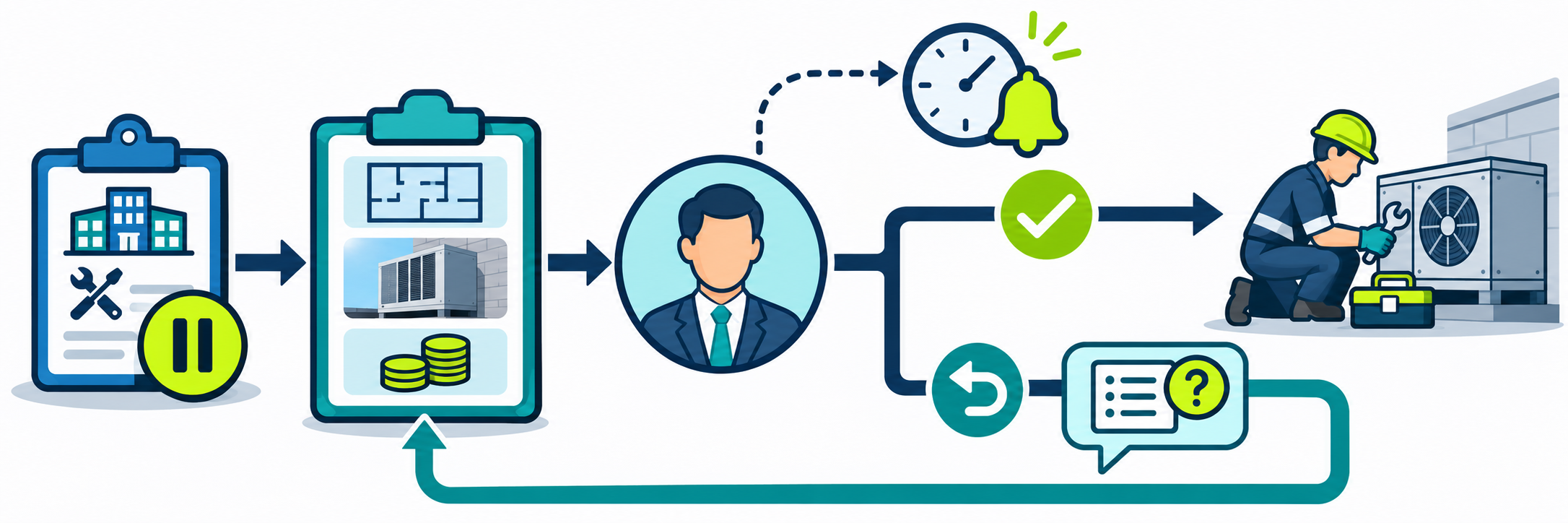
Every approval should stay connected to the relevant request, property, asset, quotation, and work order. Capture the approval type, decision required, approver, requester, date requested, target response date, attachments, comments, current state, and escalation route.
If work involves potentially hazardous equipment, approval does not replace a safe-work process. OSHA’s control-of-hazardous-energy guidance explains why maintenance procedures must protect workers from unexpected startup or stored-energy release. The software record should link the team to the organisation’s approved controls rather than imply that a digital approval alone makes work safe.
A practical approval-queue workflow
- Identify the blocker. A coordinator or technician selects a specific approval type instead of changing the work order to a vague pending status.
- Prepare the decision pack. Attach the scope, photos, quotation, diagnosis, options, risk context, and requested decision.
- Assign one decision owner. Multiple watchers can be informed, but one person or role should own the decision.
- Set the target and escalation. Base the timing on priority, contract, and operational impact.
- Record the decision. Approved, rejected, revised, or more information required should be explicit.
- Resume the work. Trigger scheduling, parts ordering, technician assignment, or another defined next action.
- Preserve the audit trail. Keep the decision, evidence, timestamps, and resulting action attached to the job.

What managers need to see in the queue
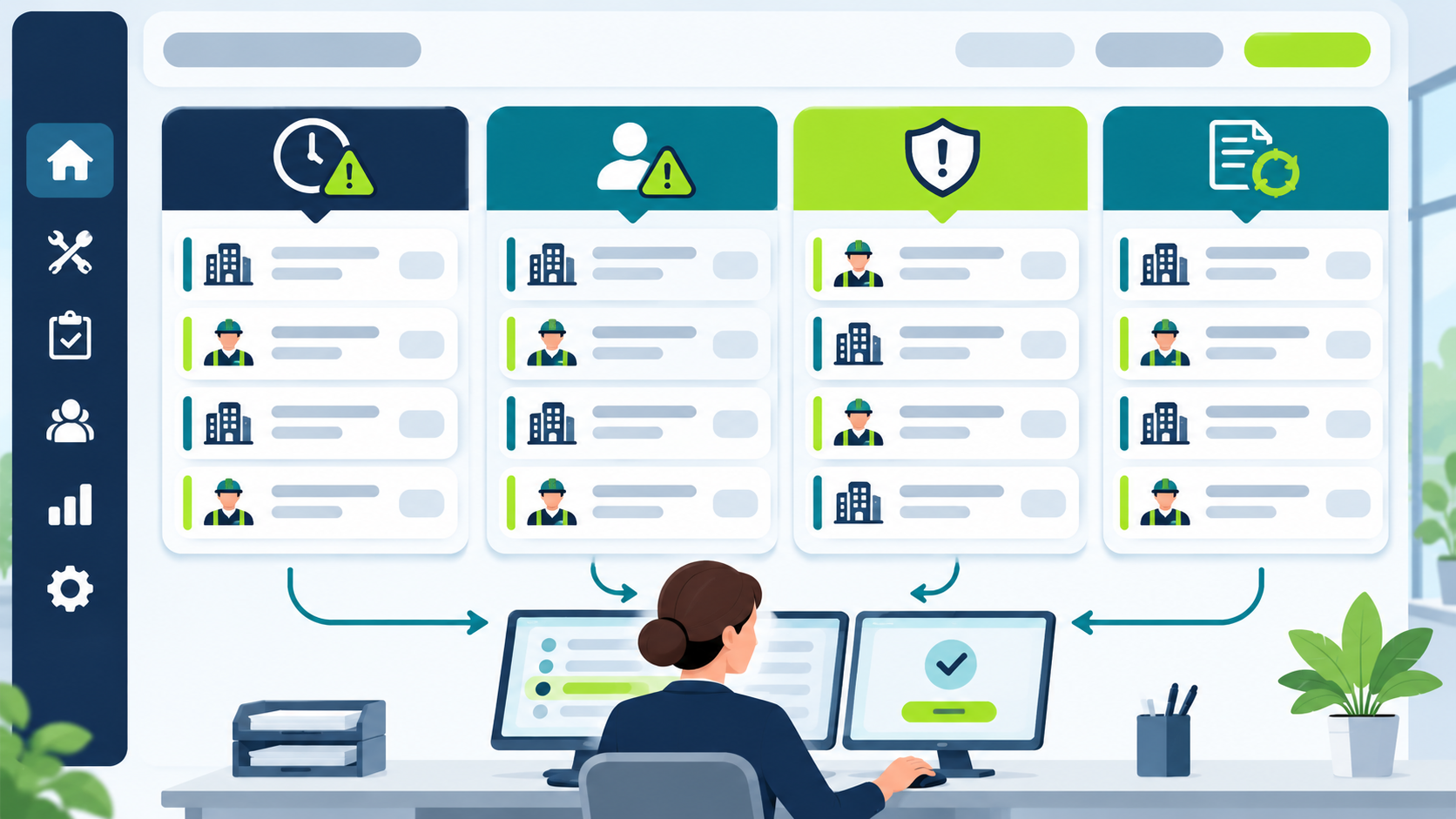
A useful queue groups work by approval type, site, client, age, priority, and owner. It highlights missing approvers, requests past their target, high-impact jobs, and items repeatedly returned for more information. The view should support action rather than become a generic chart.
For property operations, approval visibility belongs beside request intake, work orders, and operational reporting. For contractors, it should also preserve what was requested from the client and when, so teams can explain delays without reconstructing chat histories.
Design the queue around exceptions
Most routine work should flow without managerial intervention. The queue should focus attention on exceptions: high-value quotations, responsibility disputes, access failures, unavailable parts, safety-sensitive decisions, and jobs that may miss a service target.
This supports a quality-management approach based on controlled processes, performance evaluation, and continual improvement. The current ISO 9001 overview describes these as core elements of a quality management system. The standard does not prescribe a specific maintenance tool, but its process discipline is a useful design principle.
Questions to ask vendors
- Can each waiting state name a specific approver and required decision?
- Can quotations, photos, and comments stay linked to the work order?
- Can approval rules vary by client, site, value, service, or priority?
- Can the system escalate without losing the original decision owner?
- Can approved actions trigger ordering, scheduling, or reassignment?
- Can reporting distinguish team delay from external approval delay?
- Can users see a complete decision trail without exporting private conversations?
Start with the blocker that creates the most chasing
Choose one recurring approval type—such as tenant access or quotation acceptance—and define the required evidence, decision owner, response target, escalation path, and post-decision action. Test the workflow with real operating roles before expanding it.
Explore NinjaSuites for facility and property operations, or review NinjaSuites plans for your service workflow.