Answer aircond enquiries
When a customer sends a photo of a leaking unit, your AI Agent asks for the condo and room. Staff can pick up the conversation to confirm a slot.
Staff sees The fault, location and unit type.
See the WhatsApp conversation
INV-1042 · SS2 condo
AIRCOND SERVICE WORKFLOW
NinjaSuites is aircond service management software for Malaysian HVAC businesses. It connects customer enquiries, technician scheduling, work orders and invoicing from booking to repeat service.
When a customer sends a photo of a leaking unit, your AI Agent asks for the condo and room. Staff can pick up the conversation to confirm a slot.
Staff sees The fault, location and unit type.
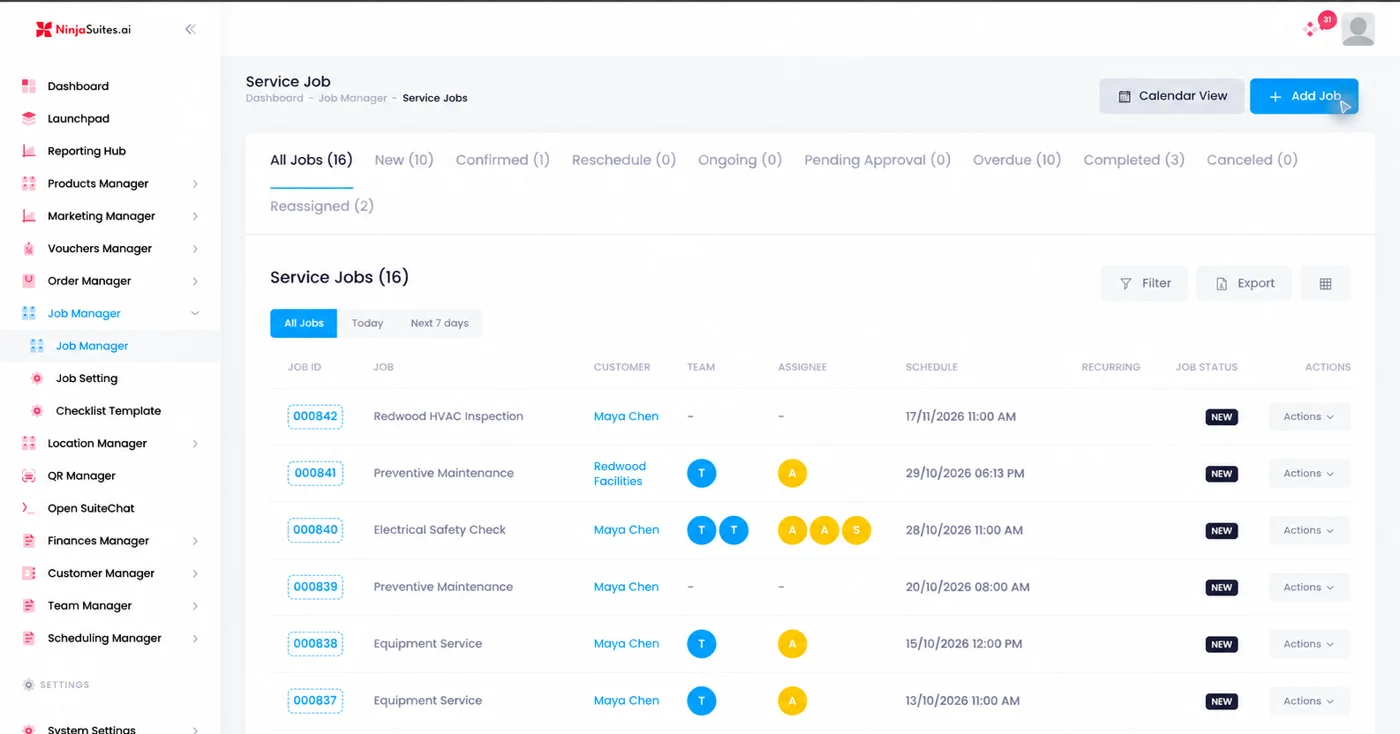
See the WhatsApp conversationThe office assigns the visit in Job Manager. The technician checks which unit needs work and what the guardhouse requires before setting off.
Technician sees A time, a work order and site access notes.
Open the Service Jobs boardBuild the draft from the service and approved repair. If the invoice is still open, a configured reminder can send the customer its balance and payment link.
Customer sees The breakdown of the bill.
See the invoice follow-upA customer sends a WhatsApp while you’re up a ladder in PJ. Your AI Agent can ask which unit is leaking, collect the condo name and pass the details to your office. The office can pick up the conversation with the unit and address already in view.
Give your AI Agent your service areas, rates and support instructions. Let a person take over when a customer needs a diagnosis, a confirmed slot or a warranty decision.
Hi, the bedroom aircond is dripping. Can someone come to SS2?
AI AgentWe cover SS2. Is it a wall unit? Send the condo name and a photo of the leak so our office can check the next slot.
Block B, SS2. It’s the wall unit in the bedroom.
Office handover: leaking bedroom unit · SS2 · visit time to confirm.
01 / BOOKINGS, SCHEDULES & WORK ORDERS
A customer changes the time. Your technician is still at the previous site. Another enquiry asks, “Can come today?” Give the office a clear view of each visit and who is taking it.
Select a job, assign a technician and follow the visit through to its invoice.
A two-unit service in Petaling Jaya costs RM180. Approving the RM60 drain repair brings the invoice to RM240.
Keep the customer, time, location and assigned technician beside the job.
Put access notes and the agreed scope where the next person can find them.
Follow the work from assignment through service checks and billing.
02 / THE NINJASUITES STAFF APP
“Which unit?” “Who has the key?” “Did the customer approve it?” Those answers matter before anyone opens a toolbox.
The Staff App brings work orders into the technician’s day. Start with the visit and the customer instead of searching through yesterday’s messages.
Details, order items, inspections and checklists sit within the work order. For an aircond visit, that means a place to organise the agreed work and record the checks.
The approval screen provides a customer approval link. Your office can follow the approval status alongside the job.
Select a screen. Tap the phone to enlarge.
 PETALING JAYA · SERVICE VISIT
SS2 condo · Petaling Jaya
Two-unit general service
| Description | Amount |
|---|---|
| General service 2 wall-mounted units × RM90 | RM180.00 |
| Drain-pipe repair Approved extra work | RM60.00 |
03 / QUOTATIONS & INVOICES
A two-unit service becomes a drain-pipe repair. The customer agrees onsite. At billing time, the office needs the approved scope and amount.
Keep quotations, work orders and invoices within your service operation. Give the person preparing the bill the details to check what was agreed and what was completed.
04 / CUSTOMERS, SITES & SERVICE CONTEXT
That meeting-room unit is leaking again. Before sending someone back, the office needs to know which unit it was, what was found and what happened last time.

Two wall-mounted units · one service location
Keep the person who booked and the place being serviced connected, even when one customer manages several sites.
Bring equipment context and past findings into the conversation before planning the next visit.
Plan the next visit with the earlier job in view. Check scheduling options against your maintenance workflow during the trial.
A customer queries an extra charge. Open the customer portal to see the report and invoice they can check.
Give each customer location its own QR code. At the next visit, your technician can open the site record and check the bedroom unit before taking the lounge unit apart.
Back at work, the customer can use their portal to find the service report and invoice. When the customer asks what the extra RM60 covered, the approved drain repair is on their invoice.
One site code for this address. The service record lists both wall units separately.
Set up your AI Agent’s follow-ups around what’s due: tomorrow’s visit, an unpaid invoice or a customer’s next service. Give each message a reason and a clear next step.
When the next service is due, send a return voucher to customers who asked for offers. Skip anyone who has already booked.
SS2 service deskHi, we’re due at Block B tomorrow between 10 and 12. Does the guardhouse need our van registration?
Setup: use the confirmed visit window. Check for a reschedule before sending.
FROM ENQUIRY TO INVOICE
This walkthrough follows a two-unit service in Petaling Jaya. The RM240 total shows how the approved repair appears on the invoice.
START WITH YOUR NEXT SERVICE DAY
Start with one customer, one site and your next visit.
See how the office and field team work through it.
Continue to NinjaSuites signup.

WHY SWITCH
Follow one leaking unit through your office. See where the next person gets the details they need.
A leak photo arrives while the crew is on the road. Nobody has the block number.
The AI Agent asks for the block and room. Staff can pick a slot with the address in front of them.
A different technician goes back. The last repair is buried in someone else’s phone.
Open the site record to check which unit leaked, what the technician found and what to inspect next.
The invoice says RM240. The customer remembers a quote for RM180.
The two-unit service and the approved RM60 drain repair appear as separate charges the customer can check.
BEFORE YOU GET STARTED
Have a particular setup in mind?
See plans and optionsConnect the business channel to SuitesChat. Your AI Agent can ask for the condo, unit type and fault. Staff picks up the conversation with those details when it’s time to confirm a slot.
Give the AI Agent instructions for callbacks. It can ask for the job reference and hand the conversation to Staff. Your service lead checks the previous findings and decides whether to send someone back.
In Job Manager, search by job ID or name, or filter by customer, assignee, schedule or status. Open Job Details to check the scheduled visit, history and checklist.
Use the location record and identify each unit by room or asset label. Put the fault, work done and next check against that unit so another technician knows where to start.
Add the entrance, parking and registration instructions to the visit. A reminder can ask the customer for the missing details before the technician sets off.
Open the scheduled job in Job Manager and choose Reschedule. Check the new time and the assigned team, then confirm the change with the customer.
Record the add-on and customer approval against the work order. In Job Details, choose Create Invoice, review the quantities and charges, then save the draft.
Job Manager supports recurring jobs. Choose the location, service, schedule and team, then review the upcoming visits against the customer’s maintenance agreement.
With portal access configured, a customer can open their visit record, read the service report and check the invoice. For the SS2 visit, they can see which unit needed the RM60 repair.
Set the follow-up to check the invoice balance before sending. Record the payment through your configured billing process and exclude settled invoices from the next reminder.
Choose customers who opted in to offers and are due for a service. Give the voucher a qualifying service, value and expiry. Exclude customers who have already rebooked.
Pick one coordinator, one technician and one upcoming job. Work through booking, site instructions, approval and the invoice together. Check plan coverage for the channels and payment setup you need.