


Short answer: the best facility maintenance reporting software does more than export PDFs. It should show you what work is coming in, how fast your team responds, what assets fail most often, which PMs are slipping, and where labor, parts, and compliance risk are building up. If a platform cannot turn raw work-order activity into clear operational decisions, it is reporting in name only.
For buyers evaluating platforms, the goal is simple: choose software that helps supervisors, facilities managers, and service leaders spot bottlenecks early and prove performance to clients, leadership, and auditors.
What good maintenance reporting software should help you answer
Before you compare vendors, start with the decisions your reports need to support:
- Are urgent jobs being completed within target response times?
- Is preventive maintenance being done on schedule?
- Which assets, sites, or contractors create the most repeat work?
- Where is downtime increasing?
- Can you prove what happened on site with timestamps, photos, and sign-off?
That is why many teams pair work order management, reporting and BI, and inspection-to-action workflows instead of buying a reporting add-on alone.
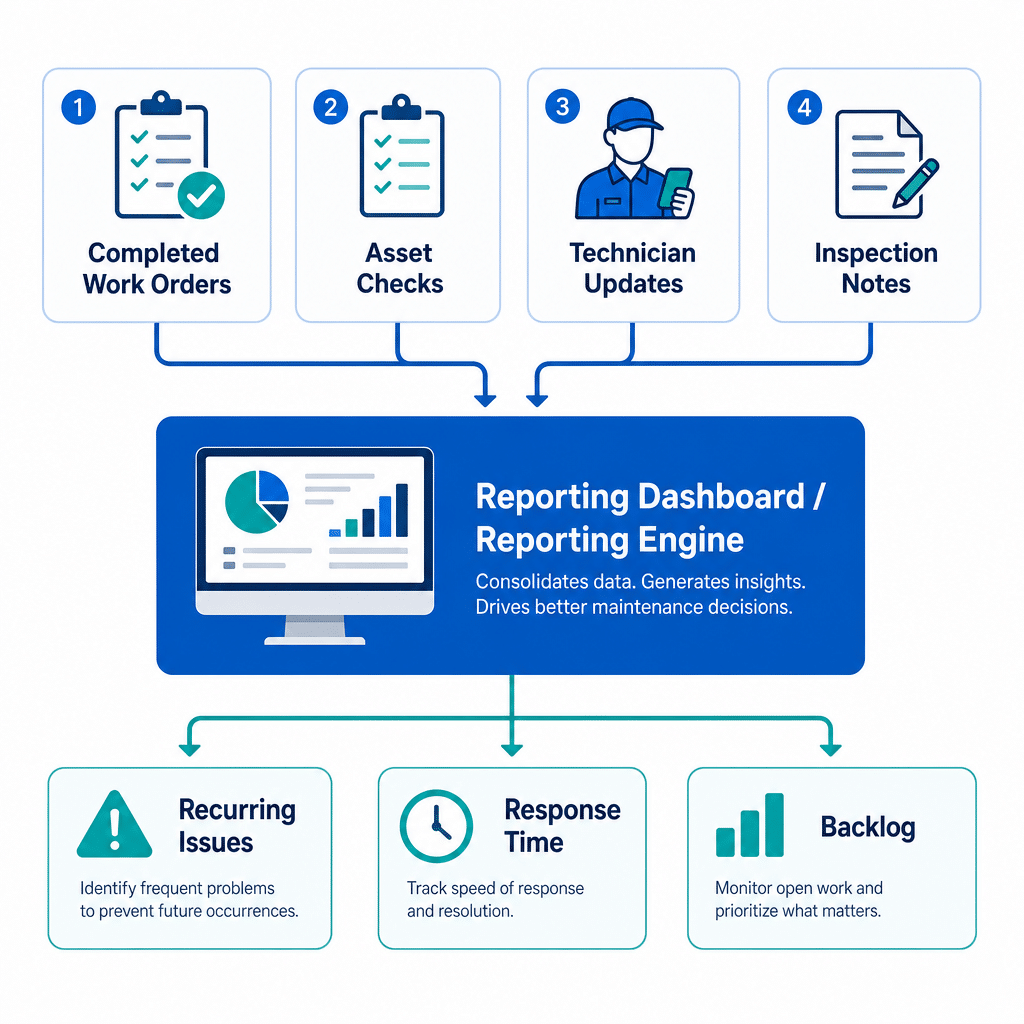
10 things facility maintenance reporting software should track
1) Work order volume and status
Track how many requests are open, assigned, in progress, on hold, overdue, and completed. This gives managers an immediate view of workload and helps separate temporary spikes from chronic backlog.
2) Response time and completion time
Report on first response, arrival time, and time to completion by priority, location, and technician. These are core service-level indicators when you manage internal stakeholders or external contracts.
3) Repeat issues and return visits
If the same problem keeps returning, your reports should make it obvious. Repeat work often points to poor root-cause resolution, missing parts, unclear SOPs, or asset end-of-life problems.
4) Preventive maintenance completion
Planned maintenance percentage and PM compliance are practical measures for understanding whether your team is staying proactive or getting pulled into reactive firefighting. A strong system should break this out by site, asset class, and assignee.
5) Asset history and downtime
Every job should roll up into a searchable asset record. Buyers should be able to review failures, repairs, downtime, and maintenance cost history before they decide whether to repair, replace, or change PM frequency.
6) Labor, parts, and vendor usage
Maintenance leaders need reports that show labor hours, parts consumed, outside contractor involvement, and total effort by job type. This is essential for budgeting and for identifying work that should be standardized or outsourced differently.
7) Inspection findings and compliance evidence
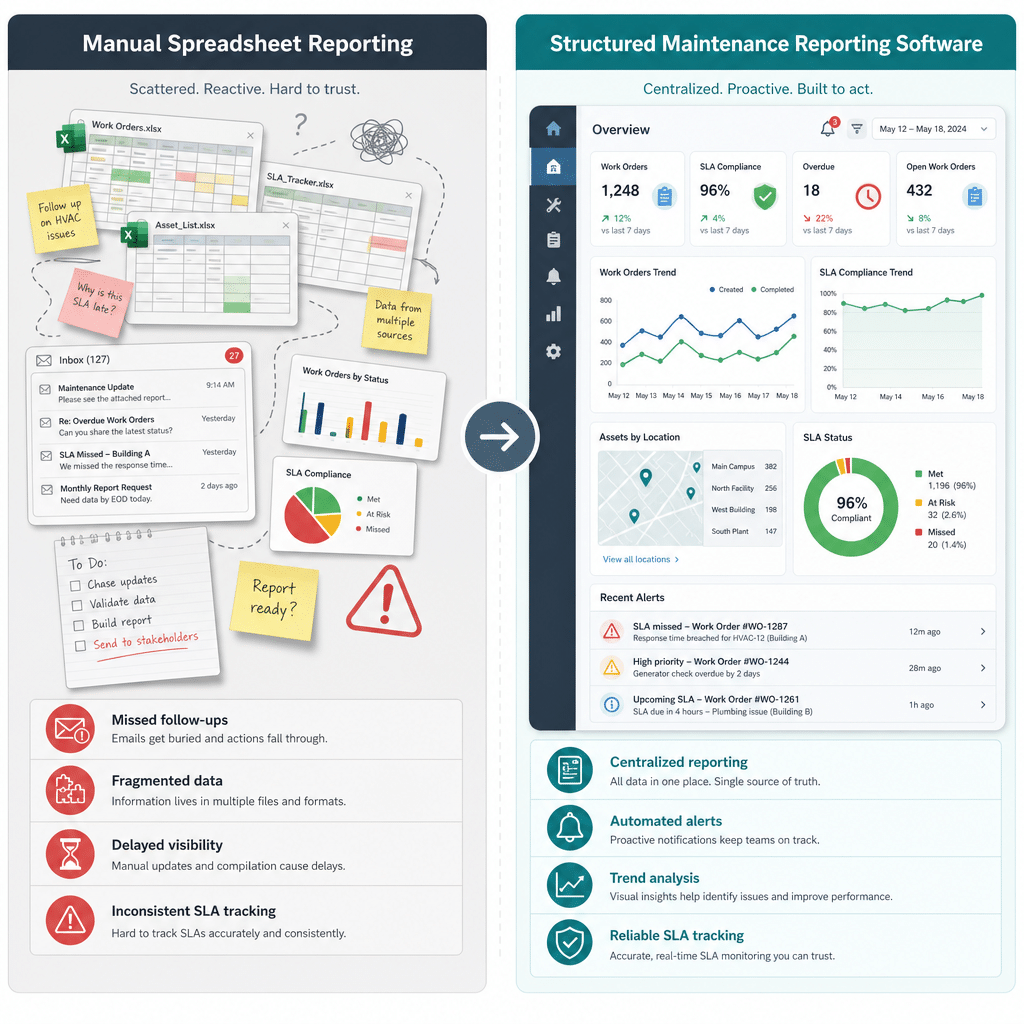
For regulated or multi-site operations, reporting should preserve inspection results, corrective actions, photos, timestamps, and digital sign-off. That creates an audit trail that is far more useful than scattered spreadsheets or chat messages.
8) Site and asset-level trends
Supervisors should be able to compare buildings, stores, rooms, or equipment groups to find failure hotspots. Trend reporting is what turns maintenance data into planning data.
9) Proof of work delivered
For client-facing service teams, reports should include job summaries, checklists completed, before/after images, technician notes, and customer sign-off. This supports accountability and reduces disputes about whether work was actually completed.
10) Backlog aging and overdue work
It is not enough to know how many open tasks you have. Good reporting shows how long jobs have been waiting and which overdue items create the biggest operational risk.
What buyers should look for in the software itself
- Real-time dashboards: live visibility instead of end-of-week manual reports.
- Asset-linked records: job history, downtime, and recurring issues connected to each asset.
- Mobile proof capture: photos, notes, timestamps, and signatures from the field.
- Flexible filters: slice by site, technician, client, asset, priority, and date range.
- Inspection-to-work-order flow: findings should create follow-up work without rekeying.
- Export and stakeholder sharing: useful summaries for management, clients, and auditors.
If your team manages field jobs across locations, those reporting capabilities usually work best when they sit inside one connected platform for maintenance and field service operations, not as a disconnected BI layer.
Where NinjaSuites fits
NinjaSuites is a strong fit for teams that want reporting tied directly to execution. Instead of reporting after the fact, you can connect work orders, preventive maintenance schedules, asset history, and dashboards and KPIs in one operating workflow.
That matters when you need to prove performance quickly, reduce manual reporting overhead, and give supervisors one place to see what is slipping.
Bottom line
If you are buying facility maintenance reporting software, do not ask only whether it can generate reports. Ask whether it can help your team control backlog, improve PM execution, document compliance, and make better repair-versus-replace decisions. That is the difference between a reporting tool and a real maintenance operations platform.
Want to see what that looks like in practice? Book a NinjaSuites demo or review pricing to compare rollout options.
FAQ
What should facility maintenance reporting software track first?
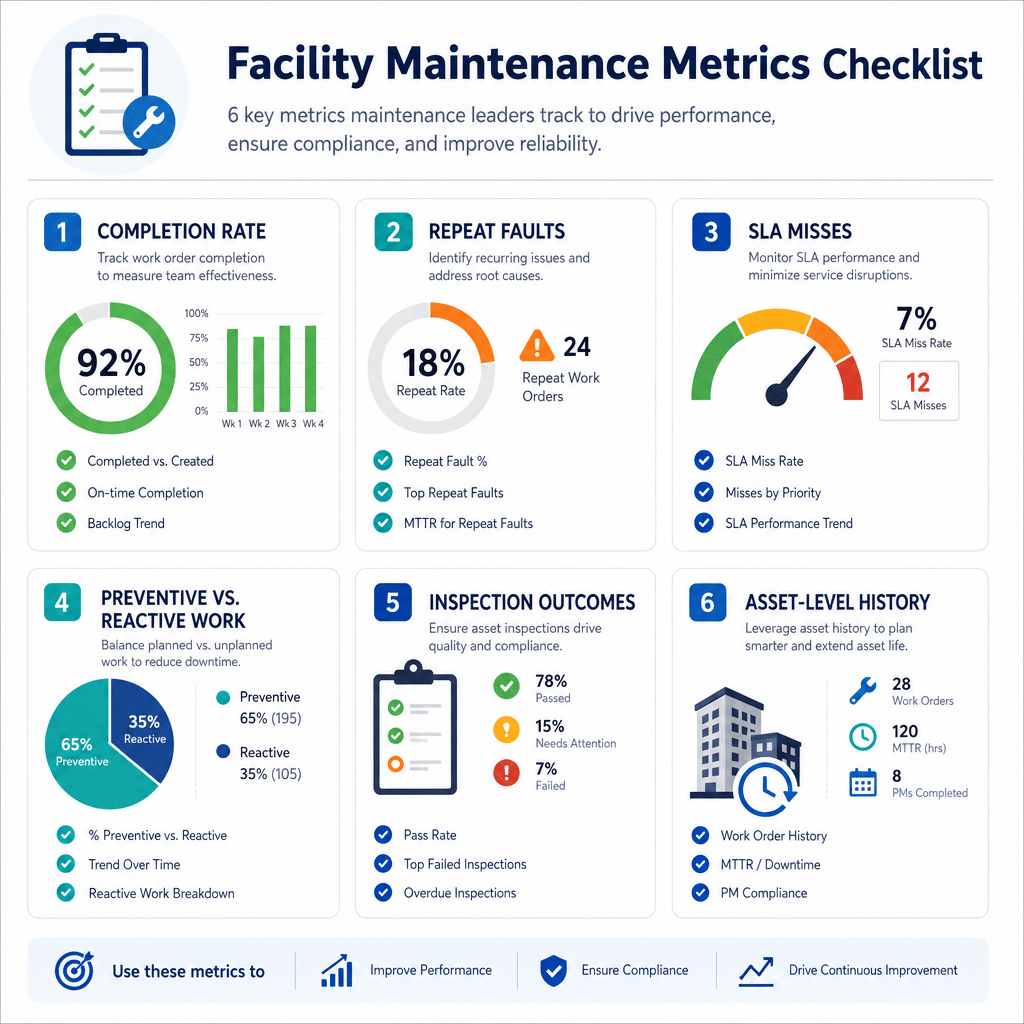
Start with work order status, response time, PM completion, asset history, downtime, and overdue backlog. Those six areas usually give the clearest operational picture fastest.
Why is asset-level reporting important?
Asset-level reporting lets you see recurring failures, total repair effort, and downtime history in one place so you can decide whether to keep repairing an asset or change maintenance strategy.
Can reporting software help with audits and compliance?
Yes. The best systems preserve inspection findings, timestamps, photos, technician notes, and sign-off so you have a stronger audit trail than email or spreadsheets can provide.