

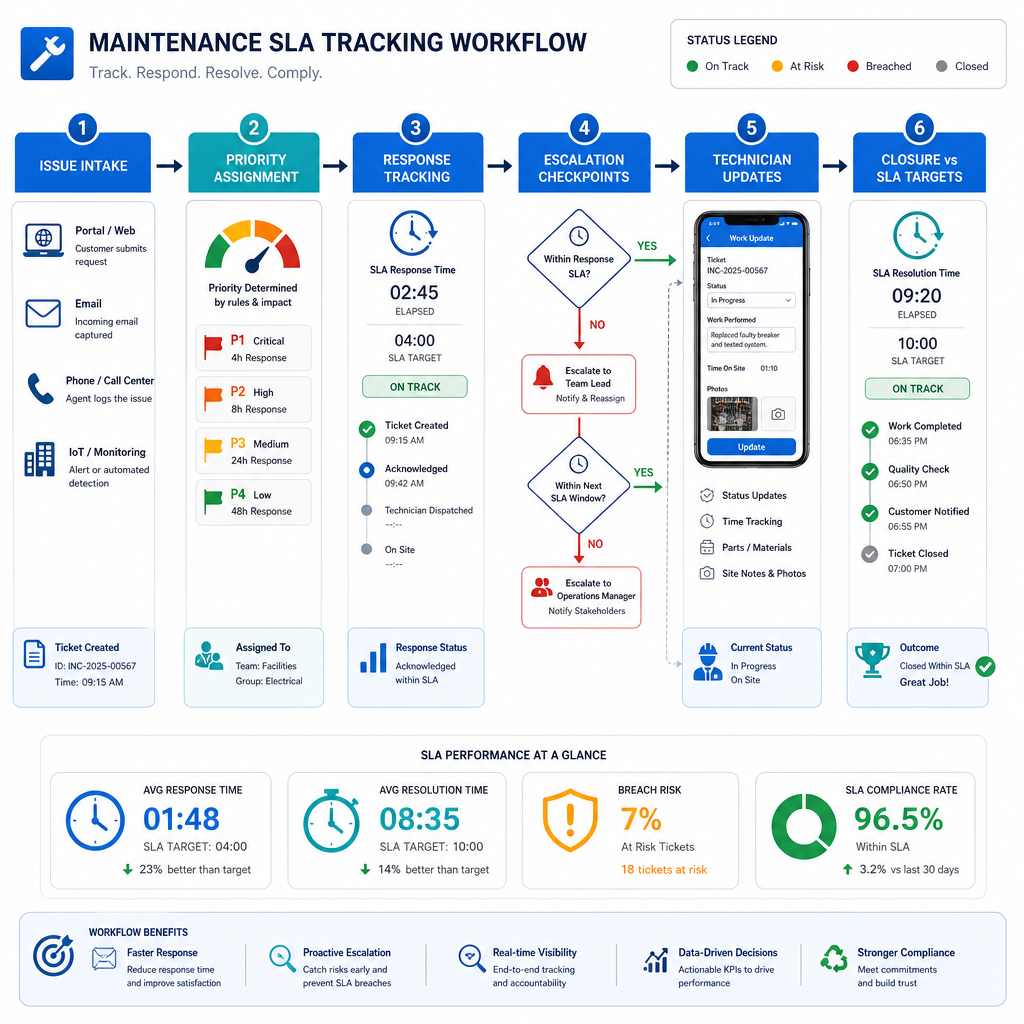
Maintenance SLA tracking software helps facility teams measure whether requests, inspections, and repairs are being acknowledged and completed within agreed response and resolution windows. The best tools do more than show a countdown clock. They connect request intake, prioritization, assignment, escalation, and reporting so managers can see risk before an SLA breach becomes a customer complaint or contractual problem.
For facility and property teams, SLA tracking matters because service performance is rarely judged on volume alone. Stakeholders care about how quickly urgent issues are acknowledged, how long repairs stay open, and whether teams can prove they met the promised service level across sites, vendors, and asset types.
NinjaSuites is commercially relevant here because its facilities positioning explicitly highlights centralized work orders, SLA tracking, and team visibility across every site. If you need a system that combines service request handling with operational execution, start with NinjaSuites for Facilities & Property Management, then review the linked modules for work order management, resource scheduling, and reporting and BI.
What maintenance SLA tracking software should actually solve
An SLA is not just a report field. IBM defines a service level agreement as a contract between a service provider and a customer that defines the service to be provided, the expected level of performance, how performance will be measured, and what happens if those levels are not met. For facility teams, that means the software has to support the operational mechanics behind those commitments.
- Response-time tracking for acknowledgement or first action.
- Resolution-time tracking for full completion.
- Priority rules so urgent work is handled differently from routine work.
- Escalation paths when deadlines are at risk.
- Cross-site visibility so managers can compare teams and vendors.
- Audit-ready history for disputes, renewals, or internal review.
IBM also notes that response time and resolution time are core SLA metrics. Those are exactly the metrics facility teams need when they manage landlord obligations, internal service standards, or outsourced maintenance commitments.
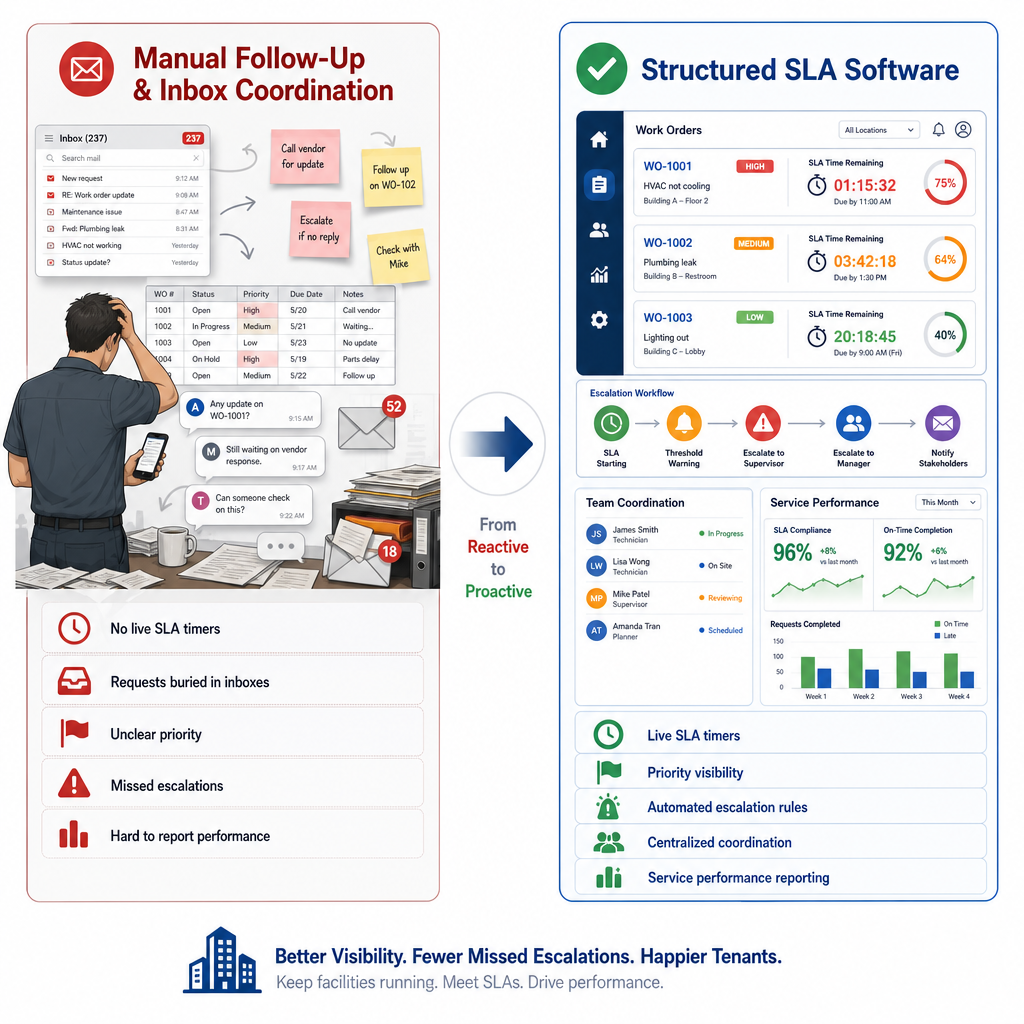
Why spreadsheets usually fail once SLA obligations scale
Many teams begin by tracking due dates manually, often with a shared spreadsheet and email reminders. That may work for a single site, but it breaks down quickly when requests come from multiple channels and require different service windows.
- Priority definitions are applied inconsistently.
- Supervisors do not see breach risk early enough.
- Work gets reassigned without a clean record.
- Vendor performance is hard to compare.
- Monthly reporting becomes a manual cleanup exercise.
For facility leaders, the cost is not just admin effort. Weak SLA tracking makes it harder to defend performance, improve staffing decisions, and maintain trust with tenants, site managers, or business stakeholders.
Buying criteria that matter for maintenance SLA tracking
1. Configurable SLA rules
You should be able to define service windows by request type, urgency, building type, customer tier, or contract. A single global timer is rarely enough for real facility operations.
2. Clear ownership from intake to completion
If the system can show a breach but cannot show who owns the next action, it will not improve outcomes. The software should connect request intake directly to work order workflow and technician assignment.
3. Scheduling that supports the SLA promise
A timer does not solve field capacity. Teams need dispatch and workload control to meet response targets in practice. That is why resource scheduling matters in the buying decision, especially for regional teams or mixed in-house and contractor models.
4. Reporting that separates response from resolution
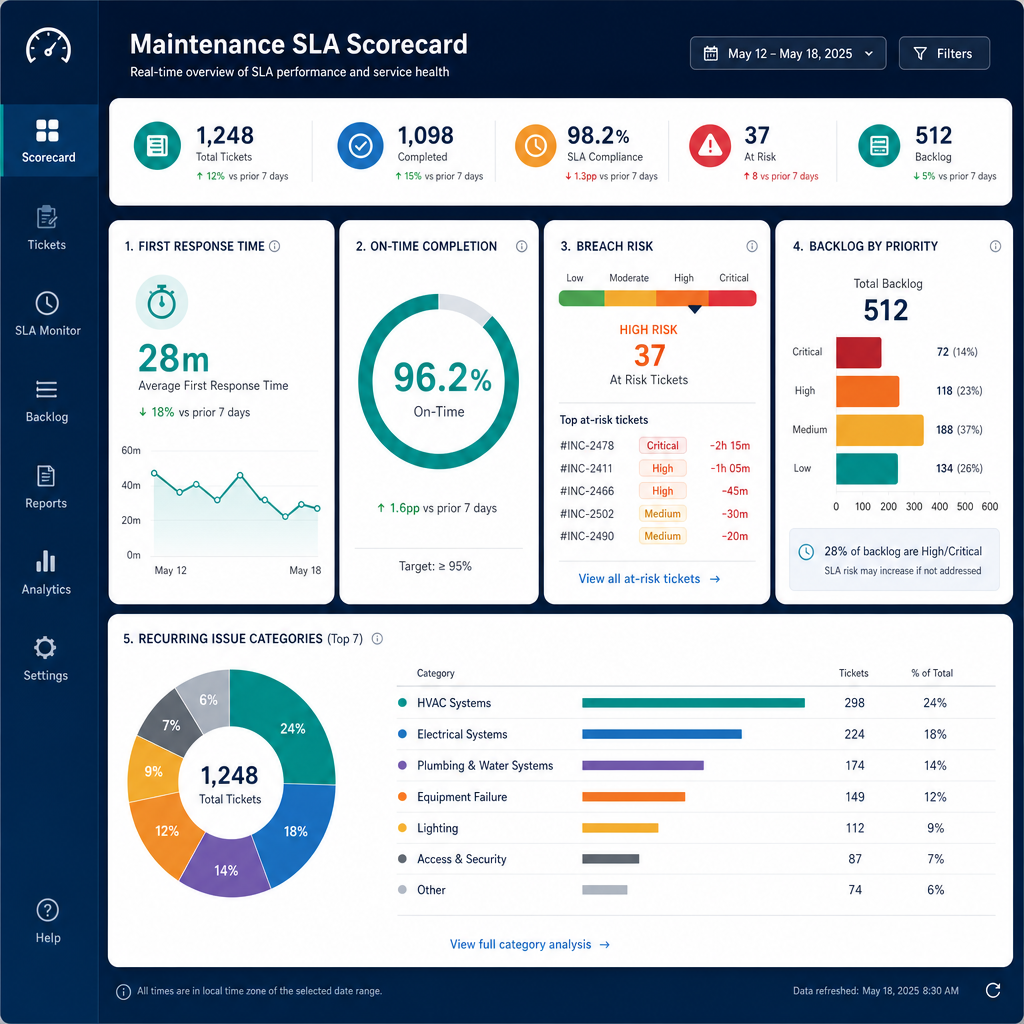
Buyers should insist on dashboards that show first-response performance, resolution performance, overdue backlog, recurring breach categories, and site-level trends. Otherwise leadership cannot tell whether the problem is staffing, triage, vendor delay, or workflow design.
5. Linkage to asset and preventive history
Recurring breaches often reflect recurring equipment problems. Software that connects SLA performance with asset history and preventive maintenance planning helps teams fix root causes instead of only measuring symptoms.
Where NinjaSuites fits for facility SLA tracking
NinjaSuites’ public facilities page emphasizes centralized work orders, SLA tracking, and visibility across sites, while its broader product pages cover the connected workflows that SLA management depends on:
- Work order management to track assignment, status, and completion in one workflow.
- Inspection and work order reporting to turn findings into action.
- Resource scheduling to coordinate labor capacity against deadlines.
- Reporting and BI for KPI dashboards and trend visibility.
That makes it a practical fit for teams that need SLA tracking embedded inside daily operations rather than bolted on as a separate reporting layer.
Questions buyers should ask in demos
- Can we set different response and resolution targets by priority, request type, or site?
- Can supervisors see upcoming breaches before they happen?
- Can the platform escalate overdue work automatically?
- Can we report by technician, vendor, site, and issue category?
- Can we trace SLA misses back to recurring assets or inspection findings?
- Can the system support both internal teams and external service partners?
How to implement SLA tracking without creating noise
Good implementation starts with a small number of clear service promises.
- Define request classes such as emergency, urgent, routine, and planned work.
- Assign response and resolution targets for each class.
- Map the escalation path for at-risk work orders.
- Make ownership explicit across coordinators, technicians, and vendors.
- Review breach patterns monthly and feed the findings into staffing, vendor management, and preventive planning.
This approach is especially relevant for facility teams that operate under internal SLAs. IBM notes that organizations also use SLAs internally between departments or teams, which fits many corporate real-estate and property-operations models.
Why facility teams should connect SLA tracking to broader FM standards
ISO 41001 frames facility management as a management system discipline, not a collection of isolated tasks. In practice, that means service-level tracking works best when it is integrated with inspection routines, work execution, asset records, and management review. Software should reinforce that system view.
When SLA dashboards are disconnected from real work, managers only see failures after the fact. When the same platform handles service intake, dispatch, completion proof, and reporting, teams can act earlier and improve performance over time.
Next step for buyers
If you are comparing maintenance SLA tracking software, ask vendors to demonstrate the full path from incoming request to deadline monitoring, technician assignment, escalation, and final reporting. A dashboard alone is not enough if your team still has to coordinate everything manually.
Book a NinjaSuites demo to see how facility teams can manage work orders, scheduling, SLA visibility, and reporting in one operating system.
FAQ
What is maintenance SLA tracking software?
It is software that measures whether maintenance requests and work orders are handled within agreed response and resolution targets, while preserving the workflow and reporting needed to manage those commitments.
What metrics matter most?
Response time, resolution time, overdue backlog, breach rate by priority, and performance by site, vendor, or technician are usually the most useful starting metrics.
Can SLA tracking improve tenant or stakeholder satisfaction?
Yes, because it helps teams acknowledge issues faster, escalate risk earlier, and prove service performance more clearly. The benefit comes from better operational control, not from the timer alone.
Why combine SLA tracking with work order management?
Because service commitments are only meaningful if the system also supports assignment, scheduling, status tracking, and completion evidence. Separate tools often create blind spots and manual follow-up.